Family tablet control
Clear tablet rules. Less arguing.
School stays open. Games wait. KidTube stays contained. Quiet hours end the day cleanly.
- Rewards from chores
- KidTube
- Quiet hours
- Parent overview


One day
A school day, at a glance.
Learning first. Fun later.
Example: Riley
Chores lead. Reward time follows.
Duolingo (Chore App)
30m
Word Search (Chore Game)
15m
Crash Course Kids (Chore Video)
10m
Sonic (Reward App)
28m
Cat Parkour (Reward App)
16m

When time is off, the tablet says so.
No guessing. No grabbing the device.
- Always-on tools stay available
- Reward apps stop cleanly
- Kids see the rule on-screen
Screens
Real screens. Real product.
No mock UI.
Parent overview
Children, alerts, banked time.
KidTube
Approved channels only.
Screen lock
Screen time is off.
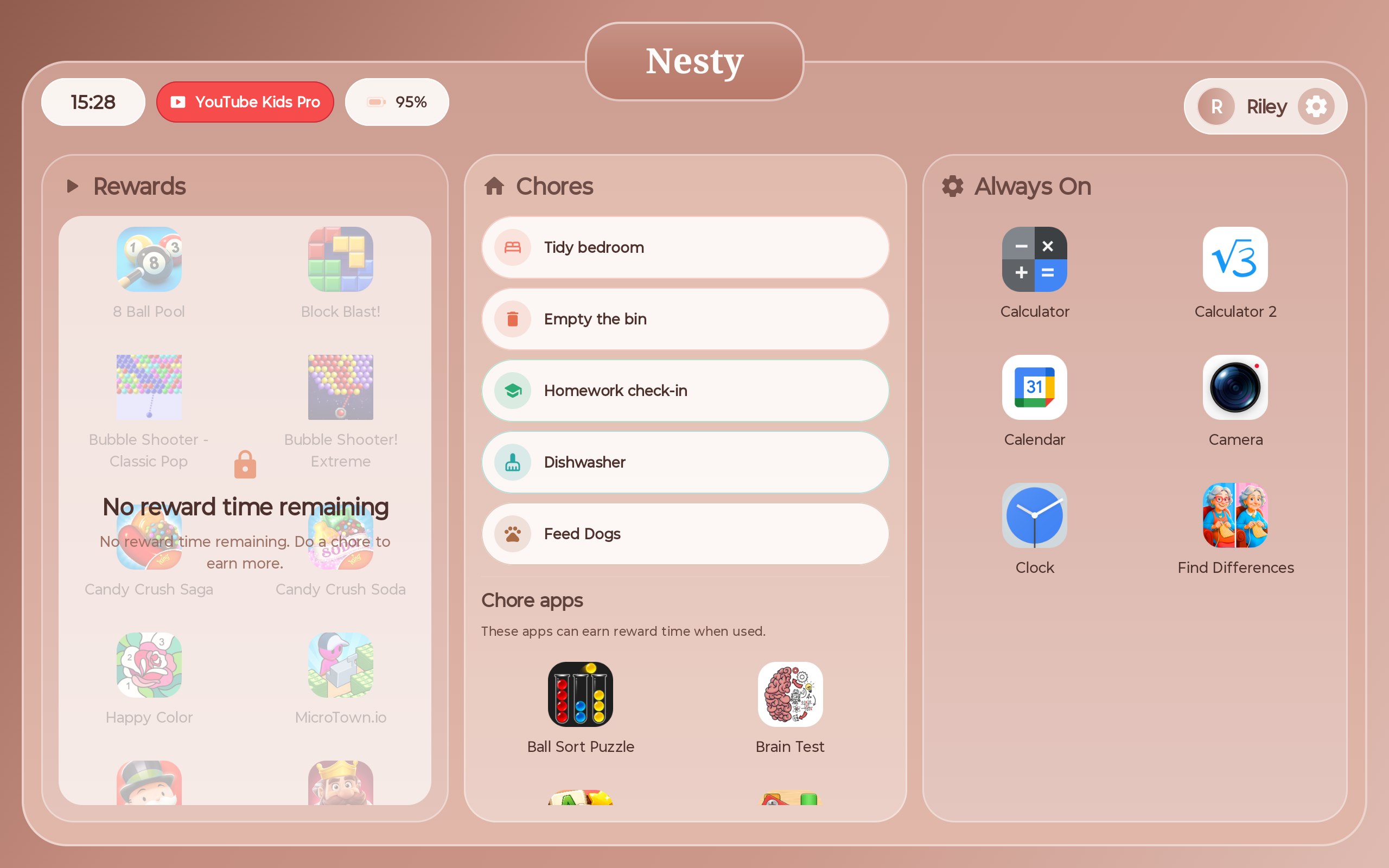
Child dashboard
Rewards, chores, always-on.
Setup
Start with a reset tablet. Install Nesty as the controlled tablet experience.
Controlled tablet
Wipe and install
Factory reset, scan the Nesty QR, and finish Android setup.
No-reset path
In progress
We are working on a no-reset setup, but reset-and-install is the launch method today.